Form W-9: A Guide for Business Owners
If your business hires freelancers, independent contractors, or vendors who aren’t on payroll, you need to file Form W-9. Filing this ensures your business stays compliant with IRS rules when preparing year-end tax reports like Form 1099. In this guide, we’ll walk you through how to file for a W-9 step by step and show you the safest ways to submit it. Getting it right from the start avoids confusion, errors, and tax season delays.Steps to file form W-9
Step 1: Get the Official W-9 Form
Always download the W-9 form from the IRS website. Avoid third-party sources to ensure the version is current. The form itself is just one page, followed by a few pages of instructions. Print a few copies or fill it out digitally, depending on your process.Step 2: Fill in the Payee’s Legal Name (Line 1)
This should match exactly what appears on their federal tax return. For individuals, this will be their full legal name. If the payee is a single-member LLC or sole proprietor, they should still enter their legal name here.Step 3: Add Business Name or DBA (Line 2)
If the person or business operates under a different name (like a "Doing Business As" name), it should be entered on Line 2. This is optional for individuals without a separate business name.Step 4: Choose the Correct Federal Tax Classification (Line 3)
This part determines how the IRS views the payee for tax purposes. Only one box should be checked:- Individual or Sole Proprietor – for self-employed individuals or single-member LLCs
- C Corporation – if the business is taxed as a standard corporation
- S Corporation – if the business has elected pass-through taxation
- Partnership – for businesses with multiple owners that are not corporations
- Trust or Estate – only if you're filling the form on behalf of a trust or estate
- Limited Liability Company (LLC) – if applicable, enter the tax classification code:
- C for C Corp
- S for S Corp
- P for Partnership
Step 5: Complete the Exemption Codes (Line 4, if needed)
Most individuals and small businesses can leave this blank. This line is for entities that are exempt from backup withholding or FATCA reporting. If someone is unsure whether this applies, they should check with their tax advisor.Step 6: Enter the Address (Lines 5 & 6)
This is where the IRS tax documents will be sent. Make sure the address is complete and accurate:- Line 5 – Street address
- Line 6 – City, state, and ZIP code
Step 7: Fill in the Taxpayer Identification Number (TIN) – Part I
This is one of the most important parts of the form. The person must provide either:- Social Security Number (SSN) – if they’re an individual or sole proprietor
- Employer Identification Number (EIN) – if they operate under a registered business
Step 8: Sign and Date – Part II
A handwritten or digital signature confirms that:- The information provided is accurate
- The signer is not subject to backup withholding.
- They are a U.S. person (citizen or resident)
W-9 Form Examples: How It Looks When Filled Out
To make it easier, here are two sample scenarios showing how a properly completed W-9 form might look: Example 1: Sole Proprietor or Freelancer- Line 1: Alex Turner
- Line 2: Turner Creative Studio
- Line 3: Individual / Sole Proprietor
- Line 4: (Leave blank if not applicable)
- Address: 456 Park Avenue, Austin, TX 73301
- TIN: 987-65-4321 (SSN)
- Signature: Alex Turner
- Date: 02/20/2025
- Line 1: Alex Turner
- Line 2: Turner Media Group, LLC
- Line 3: Limited Liability Company, enter “S” for tax classification
- Line 4: (Leave blank)
- Address: 456 Park Avenue, Austin, TX 73301
- TIN: 98-7654321 (EIN)
- Signature: Alex Turner
- Date: 02/20/2025
How to Submit a W-9 Form Securely
Your W-9 includes sensitive information like your SSN or EIN. To protect it, choose a secure delivery method:Digital Options
- Secure Portals: If the business has an encrypted upload system, use it.
- Password-Protected Files: Save the W-9 as a PDF with a password, then share the password separately via phone or text.
- Digital Signature Services: Platforms like DocuSign and Adobe Sign add an extra layer of security and validation.
- Encrypted Email: Only use email services with strong encryption. Never send an unprotected form.
Physical Options
- Hand Delivery: Still one of the most secure options when possible.
- Certified Mail: USPS tracking helps confirm safe delivery.
How Businesses Use the W-9
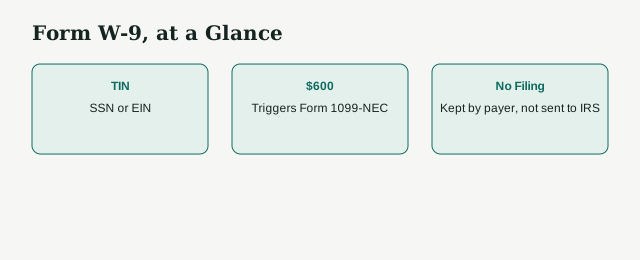
Once you collect the completed form, don’t send it to the IRS. Instead, keep it on file for at least four years. The information on the W-9 is used to prepare:- Form 1099-NEC for contractor payments
- Form 1099-MISC for miscellaneous payments
- Form 1099-DIV for dividends
- Form 1099-INT for interest
Need Help Filing Form W-9?
[Schedule your free consultation]
At LedgersCFO, we help founders, startups, and small businesses correctly file Form W-9, manage contractor records, and meet IRS requirements without stress. From guiding you through each section of the form to helping you submit it securely and store it for compliance,
Our team makes the process simple and clear. Whether you need help collecting W-9s or filing 1099s based on them, we've got your back.
FAQs
How do I fill out a W-9 form?
To complete a W-9, write your legal name on Line 1, your business name (if different) on Line 2, select your tax classification, enter your address, and provide either your Social Security Number (SSN) or Employer Identification Number (EIN). Then, sign and date the form.
Who is required to fill out a W-9 form?
U.S. freelancers, independent contractors, sole proprietors, and LLC owners who receive payments of $600 or more from a business must fill out a W-9 when asked.
What is the difference between a W-9 name and a business name?
Line 1 (Name) is your legal name as shown on your tax return. Line 2 (Business Name) is only needed if your business operates under a different name, like a DBA or LLC name; otherwise leave it blank.
Do I file the W-9 with the IRS?
No. Keep it in your internal records. Use the info to file Forms 1099 when required.
How does LedgersCFO help with filing Form W-9?
LedgersCFO supports startups and founders by streamlining W-9 collection and secure handling. We help you request, organize, and verify contractor details accurately. Our team ensures W-9 forms are collected before payments, stored safely, and used properly for IRS filings like Form 1099. Whether you have one contractor or many, we help keep your business compliant and stress-free.